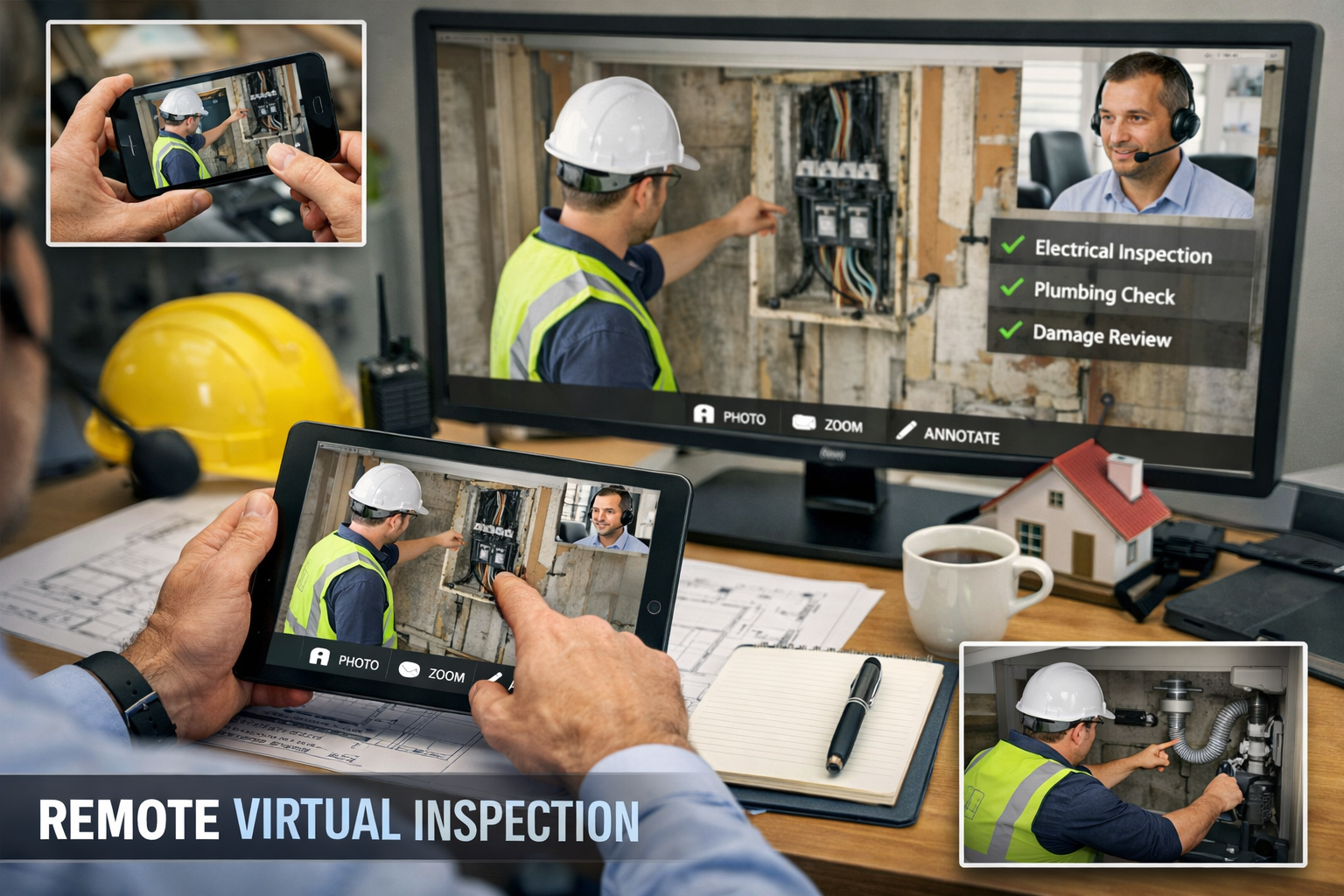
Remote Virtual Inspection is a code-compliance inspection done through live video, photos, documents, and other digital evidence instead of an in-person visit. That matters because you still have to verify the work, but you do it without spending half the day driving to a site in the next town or waiting around for access.
What Is Remote Virtual Inspection?
Remote Virtual Inspection is a formal inspection method, not a casual video call. The International Code Council defines it in plain terms as a process where the owner or contractor is at the jobsite while the inspector or inspection team performs the inspection remotely, using digital tools to review the work and make a compliance decision (ICC). In practice, that means the inspection still has teeth. It is still about code, verification, and approval, just with the inspector looking through a camera, records, and live communication instead of standing in the hallway or mechanical room.
The easiest way to think about it is this: a normal inspection is like checking the engine with the hood open in front of you. Remote Virtual Inspection is like having someone at the hood while you direct the check from across the garage, asking for the exact angle, label, clearance, or close-up you need. You are not guessing. You are still inspecting the same work.
How It Differs From a Regular On-Site Inspection
On a regular on-site inspection, you travel to the job, walk the space, and verify the work in person. With Remote Virtual Inspection, the work still gets reviewed by you, but the camera operator on site becomes your hands and eyes. That person follows your lead, whether the job is a rooftop HVAC install, a panel swap, or a final walk-through on a small commercial space.
The practical difference is control. You decide what gets shown, in what order, and at what level of detail. If a label is too blurry, you ask for another shot. If a clearance matters, you make the person move the camera lower or farther back. The site contact is not running the inspection, just helping you carry it out.
Why People Call It “Virtual,” “Remote,” or “RVI”
You will see a few terms used almost interchangeably: virtual inspection, remote inspection, and RVI. In code and software contexts, RVI usually means Remote Virtual Inspection. The label changes a little depending on the department, software platform, or policy document, but the core idea stays the same, a structured inspection done through digital communication instead of a physical visit.
How Remote Virtual Inspection Works
Remote Virtual Inspection works best when it follows a clear flow. Scheduling, documents, live video, evidence, and approval all fit together, and when one step is weak, the whole thing slows down. The good programs feel orderly from the first check-in to the final decision.
Step 1: Check Whether the Job Is Eligible
Local rules decide whether a job can be reviewed remotely. That starts with the Authority Having Jurisdiction, or AHJ, which is the local code office, department, or approved authority that gets the final say on inspection method. If the AHJ does not allow a certain inspection remotely, that is the end of the conversation.
Eligibility is not random. It often depends on scope, safety, visibility, access, and whether the work is easy to verify on camera. Hillsborough County’s virtual inspections program, for example, uses approved inspection types and requires contractors to confirm eligibility before scheduling, which is exactly the kind of gatekeeping that keeps the process clean and predictable (Hillsborough County). A water heater final might fit. A heavily concealed, complicated system might not.
Step 2: Gather the Right Documents Before the Call
A smooth remote inspection is built on preparation. Before the live session, you should have the permit, plans, correction records, required forms, and any project photos or markups that help explain the work. If the inspection depends on a specific model, submittal, or install detail, that should be ready too.
This is where a lot of time gets wasted when people wing it. Missing paperwork turns a ten-minute review into a back-and-forth mess. When everything is in one place, the live session stays focused on the actual code items instead of a scavenger hunt for file names and attachments.
Step 3: Set Up the Live Video Inspection
The live session is the heart of the process. A phone, tablet, or camera streams the site while you inspect from wherever you are, sometimes in an office, sometimes in a truck between sites, sometimes at a desk with plans open. The site contact should have stable internet, enough battery life, decent lighting, and a clear path through the job area.
You are the one directing the session. That part matters. The camera holder is not freelancing. You tell them where to start, when to zoom in, when to open a panel, and when to show the surrounding area so you can understand context. If the signal drops or the image gets useless, you do not pretend to inspect through bad video. You pause or reschedule.
Step 4: Show the Work in the Right Order
Order is everything. A good Remote Virtual Inspection usually moves from general to specific, room to room or component to component. You might start with the permit placard or address verification, then move to the main equipment, then the connections, clearances, labels, and any measurements that matter. If the work has a sequence, the inspection should follow that sequence.
Close-ups matter, but so does context. A tight shot of a label is useful only if you also know where that label sits in the system. The same goes for clearances, disconnects, duct routing, or access panels. You want enough detail to confirm compliance, not just a pretty video clip of the corner of a unit.
Step 5: Record, Verify, and Decide
A remote inspection creates a record, not just a memory. Photos, timestamps, GPS data, correction notes, and archived files help connect the inspection to the correct site and the correct permit. Some systems also tie the record to the permitted address through GPS, which helps reduce mix-ups when crews are moving between multiple jobs in one day.
Once you have what you need, you verify compliance and either approve the inspection or issue corrections. That is the decision point. If the evidence is clear, the job passes. If something is missing, unclear, or out of compliance, you document it and move to correction or escalation.
What Makes an RVI More Than a Video Call
A lot of people hear “video inspection” and picture a quick FaceTime-style check. That is not the same thing. Remote Virtual Inspection is a structured workflow with evidence, rules, and accountability behind it. Without that structure, you just have a call.
Inspector Control Still Matters
The inspector remains in charge. The contractor or site contact may be holding the camera, but you direct the inspection from start to finish. You can ask for another angle, a slower pan across the equipment, a closer look at a label, or a measurement shown against a tape.
That control is what keeps the process legitimate. If the camera operator can choose what to show and what to hide, the inspection loses meaning fast. The real value of RVI is that the workflow still belongs to the inspector, not to the person on site.
The Evidence Trail Behind the Scenes
Remote inspections usually gather more than live video. Still photos, time stamps, GPS location, correction records, and archived files all help build the record. If a question comes up later, you can see what was shown, when it was shown, and where the job was supposed to be.
That kind of trail matters for a simple reason: memory fades, and disputes happen. A recorded inspection record gives you something stronger than “it looked fine that day.” It gives you proof of what was reviewed and how the call was made.
Why Documentation Changes Everything
Documentation is what turns a live video event into an inspection file. That file supports follow-up, accountability, and audits, and it helps protect everyone when a correction is disputed later. If a contractor says a clearance was approved, or a department needs to review a pattern of failed checks, the record is there.
You can think of it like receipts for a decision. The live session is the conversation. The documentation is the part that lets you stand behind the outcome.
Why Remote Virtual Inspection Matters
Remote Virtual Inspection matters because it saves time without asking you to lower standards. That is the real pitch, and honestly, it is a strong one. If done well, it reduces wasted travel, shortens wait times, and gives you cleaner records than a rushed in-person visit squeezed between three other stops.
Faster Reviews and Less Waiting Around
A site does not always need to sit idle until someone can get there in person. With remote review, you can often schedule sooner and close out work faster, especially on straightforward inspections where the visibility is good and the scope is limited. That can mean fewer days spent waiting for a final approval on a rooftop unit, a service upgrade, or a correction visit.
The catch is that speed only helps if the inspection is ready. A sloppy remote setup can eat up more time than a quick trip would have. Still, when the job fits the format, the time savings are real.
Better Use of Inspector Time
Travel is expensive in a very practical sense, even if nobody likes to say it out loud. When you can inspect more jobs without driving between every site, you spend more time verifying work and less time burning gas on the road. That can help with backlog, staffing pressure, and the constant problem of trying to fit too many inspections into one day.
For departments covering a large service area, that matters even more. One remote session can replace a long round trip, and that can free up time for the jobs that truly need a physical visit.
Safer and Easier Access in the Right Situations
Some sites are awkward, tight, muddy, noisy, or just not worth sending extra people into unless the job truly requires it. Remote review can reduce unnecessary traffic and limit exposure when access is rough, weather is bad, or conditions on site would make a simple check a nuisance.
That said, safety is not a blanket excuse to inspect everything from a screen. It is a reason to choose the right method for the right job. When the site is hard to reach but the work is easy to verify visually, RVI fits well.
Cleaner Records for Future Reference
One of the underrated benefits is the paper trail, except now it is digital and much easier to search. Photos, notes, and archived media can help later if a correction gets questioned, a remodel touches the same system, or a supervisor wants to see how a decision was made.
A year later, nobody remembers the exact angle of a condenser pad or the state of a clearance on a windy Tuesday in March. The record does.
Who Uses Remote Virtual Inspection
Remote Virtual Inspection is useful because different groups get different wins from it. Contractors care about speed and fewer return trips. Inspectors care about control and verification. Departments care about coverage, consistency, and records.
HVAC Contractors
For HVAC contractors, RVI can save a repeat trip for final approval, correction verification, or a simple equipment check. If the unit is installed, labeled, and accessible, there is no reason to lose half a day driving back for something that can be shown clearly on camera.
It also helps when you need answers fast. Maybe you are waiting on a closeout so the customer can start using the space. Maybe a roof unit needs a final sign-off before the next trade moves in. Remote review can keep the job moving without lowering the bar.
Building Inspectors
For building inspectors, the appeal is straightforward. You can cover more ground, keep up with volume, and focus your in-person visits on the jobs that really need boots on the ground. Remote inspection does not remove your authority, it gives you another tool.
That tool is especially useful when the inspection is visual, the scope is narrow, and the evidence is easy to verify. It can also help when a recheck is needed after a minor correction. No need to turn a small fix into a full return trip.
Government Inspection Departments
For government departments, the value often shows up in scheduling and consistency. Remote workflows can reduce delays, help manage demand, and make inspection procedures more repeatable across a wider area. A county with scattered jurisdictions or long drive times can feel the difference quickly.
Departments also get better records. When the workflow is standardized, it becomes easier to explain decisions, review performance, and train new staff without everyone inventing their own process.
Private Providers and Third-Party Programs
Private inspection providers and approved third-party programs use RVI too, as long as the local authority allows it. In those settings, the same basic rules still apply: the inspection must be documented, controlled, and tied to the proper authority and scope.
The name on the door changes. The standards do not.
What Can Be Inspected Remotely
Not every inspection fits the remote format, and pretending otherwise creates problems. The question is not, “Can this be shown on a screen?” The real question is, “Can this be verified clearly enough to support a code decision?”
Common Eligible Inspection Types
Remote review often works well for inspections where visibility is good and the evidence is mostly visual. That can include certain HVAC checks, mechanical components, electrical terminations that are easy to access, and finish-stage items where the important details are visible without destructive testing.
You will also see it used for correction rechecks and final verification on straightforward installs. If the item can be shown clearly, labeled clearly, and measured clearly, it has a decent chance of fitting the format.
Jobs That Usually Need an On-Site Visit
Some work just does not belong in a remote workflow. Concealed conditions, complicated assemblies, tight hazard areas, or anything that requires touch, smell, or hands-on testing usually points back to an in-person visit. If you cannot verify the condition with enough confidence on video, the remote option is a poor fit.
The same goes for situations where the environment makes the image unreliable. Steam, glare, darkness, clutter, or a camera that cannot get into the right position can all make the review too weak to trust.
When the Inspector Can Escalate
This part is simple: you can stop the remote inspection whenever the process stops working. If connectivity fails, the scope becomes unclear, the site conditions are messy, or safety gets in the way, you escalate to an in-person inspection or reschedule.
That option is not a failure. It is part of the system. Good RVI programs make that call easy instead of trying to force every job into the same box.
Rules, Authority, and Compliance
Remote Virtual Inspection only works when the rules behind it are clear. The technology matters, sure, but authority and procedure matter more. Without those, the process becomes a loose habit instead of a legitimate inspection method.
AHJ Rules Come First
The AHJ, or Authority Having Jurisdiction, is the local decision-maker for code enforcement. That might be a city department, county office, state agency, or approved authority, depending on the project and location. If the AHJ allows Remote Virtual Inspection, it is because that office has accepted the method for a specific scope under specific conditions.
That means local policy always comes first. No national trend overrides a local rule that says an inspection must be done in person. The permit and the jurisdiction decide the lane.
How NFPA 915 Fits In
NFPA 915, first published in 2024, helps formalize the remote inspection space by setting minimum requirements for procedures, methods, transmission, data collection, and documentation for remote inspections and tests (NFPA 915). That matters because it pushes the practice away from improvised video calls and toward repeatable standards.
For you, that means the industry is not treating remote work as a one-off convenience anymore. It is becoming a defined process with expectations around how evidence is collected and how decisions are recorded.
Why Local Policies Still Vary
One county might allow a remote HVAC startup review. Another might require a site visit for the same job. That is normal, even if it feels annoying. Different departments have different risk tolerances, staffing levels, and code procedures, so policy stays local.
The practical lesson is simple: never assume a remote approval in one place means automatic approval somewhere else. The jurisdiction sets the terms.
Why Standard Procedures Protect Everyone
Clear procedures protect you as much as they protect the department. When the process spells out what counts as eligible, what must be documented, and what triggers escalation, nobody has to guess in the middle of a live inspection. That cuts down on arguments, rework, and inconsistent decisions.
A good checklist does more than keep the inspection tidy. It makes the decision defensible.
Tools and Technology That Support RVI
The tech behind Remote Virtual Inspection does not need to be fancy. It just needs to work well enough to support the workflow. The point is not to show off software. The point is to make the inspection easier to run and easier to document.
Live Video and Mobile Devices
Most remote inspections start with something basic: a phone, tablet, or camera that can stream live video. A mobile device is often enough, as long as the image is stable and the person on site can move around without losing the connection every thirty seconds.
You do not need a production studio. You need a reliable feed, a clear picture, and someone who can hold the camera steady while following directions.
Photo Capture, Time Stamps, and GPS Data
Still images help when you need to freeze a detail and inspect it closely. Time stamps show when the evidence was gathered. GPS data can tie the record to the permitted address, which helps confirm that the right site was reviewed and cuts down on record errors.
Those details sound small, but they matter a lot when files get reviewed later. They turn a visual check into a traceable record.
Digital Checklists and Inspection Forms
Checklists keep the inspection moving in the right order. Instead of relying on memory, you can work through a standard set of items and make sure nothing gets skipped. That is especially useful when the same type of inspection is repeated all day across different sites.
Forms also make training easier. A new inspector or site contact can follow a structured workflow without having to guess what comes next.
Document Storage and Record Archiving
Plans, correction records, photos, and approvals need to live somewhere after the call ends. Good archiving keeps everything tied together so the record is easy to find later. If a permit question comes up six months from now, you want the file to be intact and searchable.
That is part of the real value of RVI. The inspection does not disappear when the video ends.
Low-Connectivity Options
Not every jobsite has great signal. Rural locations, basements, and active construction sites can all be spotty. Some systems handle weak connectivity better than others, which matters when you are trying to inspect from a field with one bar and a truck in the driveway.
The trick is to plan for that reality before the appointment starts. A system that works only when the signal is perfect is not a dependable system.
How to Prepare a Site for a Remote Virtual Inspection
A remote inspection lives or dies on preparation. If the site is ready, the process feels smooth. If the site is chaotic, everyone wastes time asking for the same three angles over and over.
Confirm the Jobsite Is Ready
Before the call, check lighting, power, access, and camera visibility. If the area is dark, turn on lights or bring a flashlight. If the equipment is tucked behind storage boxes, clear the path. If the camera cannot get close enough to a label, move the clutter now instead of discovering it during the inspection.
That small bit of prep saves real time. It also makes you look like you know exactly what you are doing, which helps.
Put the Right Person on Site
Someone on site needs to hold the camera, listen carefully, and move the walkthrough along. That person does not need to be a code expert, but the person should be reliable enough to follow directions without improvising.
A good camera operator makes the inspection easier. A distracted one can turn a simple job into a frustrating mess. Pick the person who can stay focused for the whole session.
Stage the Work So It Can Be Seen Clearly
Open panels, remove loose clutter, and make sure labels, clearances, and access points are visible. If the inspection depends on a measurement, have the measuring tool ready. If a nameplate matters, make sure it is not hidden behind a wire bundle or a reflection.
The goal is not to stage the site like a movie set. The goal is to make the actual compliance details visible without a scavenger hunt.
Test the Signal Before Inspection Time
A quick connection check can save everyone from a failed session. If the signal is weak where the equipment is installed, find a better spot or plan for a different method before the appointment starts. A five-minute test is a lot better than a blown inspection window.
That sounds obvious, but it gets skipped all the time. Don’t skip it.
Common Problems and How to Fix Them
Remote inspections are practical, but they are not magic. A few predictable problems show up again and again, and most of them are fixable if you spot them early.
Bad Lighting or Blurry Video
If the image is dark or fuzzy, stop pretending it is good enough. Move closer, change the angle, turn on a work light, or use a flashlight to cut through the glare. If the camera cannot show a detail clearly, the detail is not actually being inspected.
Sometimes the fix is as simple as stepping to the other side of the unit or waiting for the sun to shift. Tiny adjustments make a big difference.
Weak Internet or Dropped Connections
Bad signal can ruin an inspection fast. If the video keeps freezing or dropping, move to a stronger location, switch devices, or reschedule the inspection. A broken connection is not a minor inconvenience when the whole decision depends on what you can see.
The best move is to catch weak connectivity before the appointment starts. Once you are in the middle of a review, every lost minute compounds the delay.
Missing Documents or Unclear Markups
If the permit, plan, or correction record is missing, you will spend the session chasing paperwork instead of inspecting. Get the files ready beforehand and make sure any markups are readable. Tiny, blurry annotations are almost useless when someone needs to verify a code item quickly.
Clean documentation makes the call easier and reduces rework. Messy documentation does the opposite.
Wrong Angle, Wrong Detail, Wrong Moment
Sometimes the site contact just points the camera at the wrong thing. That happens. The fix is to slow down and give very direct instructions. Show me the nameplate. Now pan back. Now lower the camera three feet. Now turn toward the disconnect.
The trick is to be specific. General instructions produce general video, and general video is rarely enough.
Benefits and Tradeoffs
Remote Virtual Inspection has real advantages, but it is not a cure-all. The strongest programs know exactly where it helps and where it stops helping.
The Biggest Wins
The biggest wins are speed, flexibility, documentation, and better use of inspection time. You can reduce travel, avoid unnecessary repeat visits, and keep jobs moving when the work is easy to verify remotely. You also get cleaner records than a casual phone call or a rushed verbal approval.
For contractors, that often means faster closeout. For departments, it often means better coverage and less backlog.
The Catch You Should Know
The catch is that Remote Virtual Inspection is not a replacement for every physical visit. Some work still needs hands-on verification, and some sites are simply too messy or too risky for a remote review to be trustworthy. If you force the process where it does not fit, you create more work, not less.
So yes, use it. But use it where it actually makes sense.
What Good Programs Have in Common
Good RVI programs do three things well. They set clear rules, train people to follow them, and document the inspection in a way that stands up later. That is the difference between a real process and a shaky workaround.
If the program feels improvised every time, it probably is.
Common Misconceptions About Remote Virtual Inspection
A lot of resistance around RVI comes from bad assumptions, not bad evidence. Once those assumptions get cleared up, the process usually makes more sense.
“Remote Means Less Strict”
No. Remote does not mean softer. The same code compliance still applies, and the inspector still has to verify the work before making a decision. The only thing that changes is the method of review.
If anything, a good remote process can be more disciplined because it forces you to document what was shown and how it was checked.
“The Contractor Runs the Inspection”
Also no. The contractor may handle the camera, but the inspector directs the inspection and decides the outcome. That distinction is the whole point of the process. If the contractor controls what you see, the inspection is not really under inspection control.
“It’s Just for Emergency Situations”
That is outdated thinking. Remote inspections are used for routine work, correction checks, and approved inspection types where the local authority allows it. Emergencies may have sped up interest in the method, but the method is not limited to emergencies.
“A Photo Is Enough”
A still photo can support the record, but it is not the same as a full remote inspection. A live session lets you ask follow-up questions, request different angles, and verify context in real time. That back-and-forth is what makes the inspection meaningful.
Real-World Use Cases
The best way to understand RVI is to picture it on an actual jobsite, not in theory. Real use cases make the workflow obvious.
HVAC Equipment Closeout in a Suburban Neighborhood
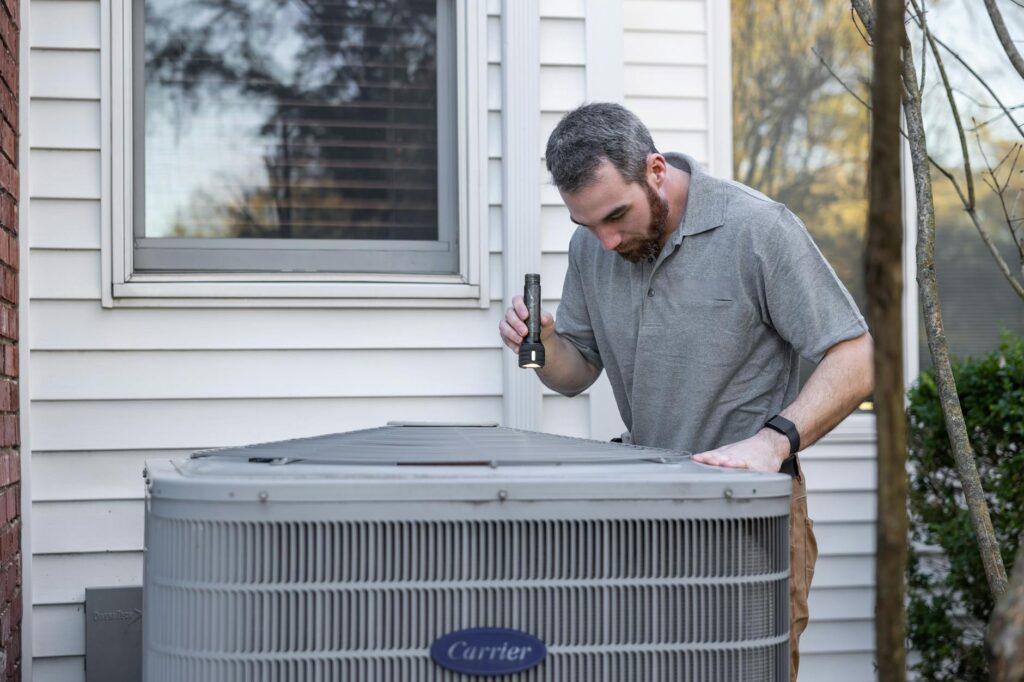
Picture a new rooftop unit or condenser install behind a home in a suburban neighborhood. The contractor stands near the equipment, points the camera at the nameplate, shows the clearances around the unit, and pans over the disconnect and labeling. You ask for a closer view of the electrical connection, then a wider shot showing the full placement against the structure.
The whole thing can be done without a second trip if the setup is clean. For a straightforward HVAC closeout, that can save a lot of wasted driving.
A Building Department Cutting Drive Time
Now picture a building department covering a wide county with offices spread miles apart. Instead of sending an inspector across the county for every small correction visit, the department uses remote sessions for approved inspection types. One afternoon, that might replace three separate drive-heavy stops.
That is not just convenience. That is workload management.
A Field Check After a Correction
A contractor fixes a clearance issue, uploads the correction record, and schedules a remote recheck. You log in, ask for the repaired area, confirm the change, and close the item out. No need for a full site visit if the correction is visible and the scope is narrow.
That kind of follow-up is where RVI often shines.
A Rural Jobsite With Patchy Access
Imagine a rural mechanical job where the only usable signal is near the truck parked by the driveway. The site contact tests the connection ahead of time, walks the camera to the equipment, and uses saved photos plus live video to show the install. The GPS tag helps tie the record to the correct address, which matters when multiple sites are in play.
With the right prep, even weak-connectivity jobs can still move forward.
How Departments and Contractors Get Started
Getting started does not have to be complicated. The best approach is to make the process small, clear, and repeatable before you try to scale it.
Build a Clear Policy
A good policy spells out which inspections qualify, what documents are required, how scheduling works, and when to escalate to an in-person visit. It should also define who can approve remote review and how records are stored.
If the policy is vague, every inspection becomes a debate. If it is clear, the process gets easier fast.
Train Staff and Site Contacts
Short, practical training goes a long way. Inspectors need to know how to run the workflow. Contractors and site contacts need to know how to hold the camera, what to show first, and how to respond when you ask for a different angle.
This is not a heavy training lift. It is mostly about getting everyone on the same page before the first live session.
Start With a Narrow Pilot
Start with a limited set of inspection types or a single area. A narrow pilot lets you see where the process breaks down without putting the whole department or company at risk. Maybe you begin with easy HVAC finals or simple correction rechecks, then expand once the workflow proves itself.
That slower start pays off. It reveals the weak spots before they become habits.
Review and Improve the Workflow
After a few inspections, look at what slowed things down. Was the camera angle bad? Were the documents missing? Did scheduling get messy? Use those issues to tighten the checklist and improve the script for the next session.
Good remote programs get better because someone bothers to review them. That part is worth doing.
Why This Matters for the Future of Inspections
Remote Virtual Inspection is part of a bigger shift toward field verification that is more flexible, more documented, and easier to repeat. It is not about skipping work. It is about doing the same work with less friction.
More Efficient Work Without Cutting Corners
The real promise is efficiency with standards intact. You still verify the code items. You still document the outcome. You just remove some of the wasted motion that slows traditional inspection work down.
That is a better way to think about it than “faster inspections.” Faster is nice. Better process is the real prize.
Better Standards Are Already Emerging
Formal guidance like NFPA 915 shows the practice is becoming more structured, not more casual. That matters because strong standards make remote review easier to trust, easier to teach, and easier to defend later. The more repeatable the process gets, the less it depends on any one person’s style.
A Smarter Default for the Right Jobs
Remote Virtual Inspection works best when you treat it like a proper inspection method, not a shortcut. If the job is eligible, the site is ready, the connection is solid, and the checklist is clear, the process can save time and improve recordkeeping without cutting corners.
Start there. One eligible inspection, one stable connection, one clear script. That is usually enough to show you what this method can do.